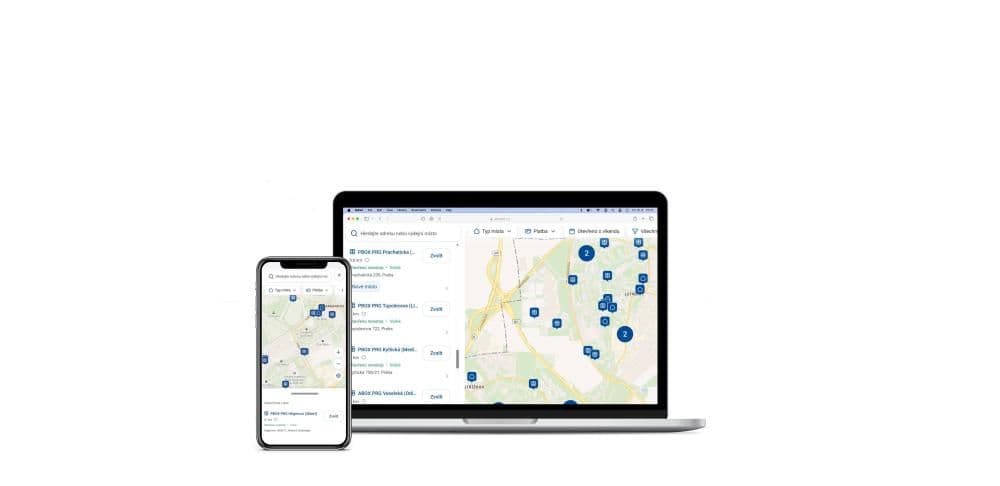
We are launching a completely redesigned map widget for choosing pickup points (PPL ParcelBoxes, AlzaBoxes and ParcelShops). For e-shop developers this means three things: an end to conflicts with your site's global CSS, integration through a single HTML tag with no framework dependency and faster performance in the browser.
Migration notice: If your site uses a customised variant of the original 1.x version, you need to migrate by 31 August 2026 at the latest to version 2.0.
You will find the full technical documentation and API reference on the official PPL Widget 2.0 documentation portal.
An architectural shift: version 1.x vs Widget 2.0
The older generation of the widget injected its code into the global scope of the page and required an external CSS file to be loaded manually into the document head. Version 2.0 changes the principle of integration from the ground up.
1. Isolation through Shadow DOM
The biggest pain point of version 1.x was style leakage. Developers had to make their changes through specific selectors (e.g. #ppl-parcelshop-map .accordion-map--select { display: none !important; }), which, depending on the CSS framework in use (Tailwind, Bootstrap), often broke the look of the e-shop.
Widget 2.0 is built as a Web Component with a Shadow DOM. The entire widget lives in its own isolated DOM tree:
➡️Your e-shop's global styles do not reach inside the widget.
➡️Conversely, the internal styles of the map will not affect the look of your basket.
Important for migration: it is precisely because of this isolation that old CSS overrides targeting #ppl-parcelshop-map stop working. If you styled the v1.x widget with your own CSS, this is the main reason why migration is necessary. The appearance and behaviour of Widget 2.0 is set through the configuration in the API key administration, not by overriding styles from the outside.
2. Mandatory authorisation with an API key
In the original version it was enough to place the universal container <div id="ppl-parcelshop-map"> on the page. Version 2.0 introduces access management through an API key.
The benefits:
➡️greater security and stability of the endpoints,
➡️widget configuration (permitted countries, types of point, language) tied directly to your key,
➡️an overview of the map service calls made for your e-shop.
⚠️ Before you integrate: You first need to generate an API key and activate it in the administration. Then remember to set the permitted domain (or domains) in the widget administration — the widget will only load on domains explicitly assigned to your key.
3. Framework independence — React, Vue and plain HTML
No more awkward initialisation inside component lifecycles. Widget 2.0 is a standard web component with React bundled inside — so your site does not need React (or any other framework).
As a result it works just as simply in every environment:
➡️Plain HTML / Vanilla JS — you insert a single tag.
➡️React — you insert the same tag into your JSX and respond to events with the usual addEventListener.
➡️Vue, Angular and others — web components are natively supported by all modern frameworks.
You need no special npm package and no server-side SDK — the integration is always the same: one HTML element.
Quick start: what the integration looks like in practice
Loading is asynchronous and non-blocking — no synchronous <link rel="stylesheet"> in the <head> as before. Simply load the loader script and insert the component with your API key and configuration.
Static HTML / Vanilla JS integration
<!-- The loader fetches the widget files it needs by itself -->

<script src="https://www.ppl.cz/accesspointwidget/loader.js" async></script>

<ppl-access-point-widget
    api-key="YOUR_API_KEY"
></ppl-access-point-widget>
➡️api-key (required) — the key assigned to you by PPL.
➡️config (optional) — JSON with the settings: mode, language, default country, inline vs modal display.
Handling the pickup point selection (event handling)
The widget announces the selection through a custom event (CustomEvent) that it dispatches directly on its own element (not on document). The object returned in event.detail is structured and typed — it contains precise geolocation data, the type of point (ParcelShop / ParcelBox / AlzaBox) and payment information.
JavaScript
<script>
const widget = document.querySelector("ppl-access-point-widget");

widget.addEventListener("ppl-accesspointwidget-select", (event) => {
  const selectedPoint = event.detail;
  console.log("ID of the selected pickup point:", selectedPoint.id);
  console.log("Complete data:", selectedPoint);
});
</script>
Besides the selection, the widget also reports other states you can hook into:
Event When it occurs ppl-accesspointwidget-select The user has selected a pickup point ppl-accesspointwidget-close
The user has closed the widget
ppl-accesspointwidget-error
An error occurred (e.g. an invalid API key)
ppl-accesspointwidget-ready
The widget is initialised and ready
New features and conveniences for users
Filtering by type of point
In a matter of seconds, users can narrow their choice between PPL Boxes, partner AlzaBoxes and bricks-and-mortar PPL Shops, and they can also filter by further criteria (opening hours, card payment, shipment size, step-free access). The filters are optimised so that even when several conditions change at once, only one request goes to the server — the results therefore appear quickly and without unnecessary load.
Favourite points and history right in the widget
New in this release is saving favourite points (the heart icon) and a history of the most recently chosen locations directly in the browser (Local Storage). On a repeat purchase the customer does not have to search again — their points are immediately to hand.
Better behaviour on mobile
The widget adapts to the size of the space you place it in. If the parent element has no fixed height, the widget expands sensibly so that it is comfortable to use at the mobile checkout — which helps customers complete their order.
Search and geolocation
Address search with autocomplete and the option to find the nearest points based on the user's current location come as standard.
Transition timeline
➡️Widget v1.x (legacy): architecturally it will not be developed any further. Standard integrations keep running, but heavily customised widgets (custom CSS overrides, non-standard e-commerce solutions) must move to version 2.0.
➡️31 August 2026: the final deadline for migrating all customised widgets to version 2.0. After this date, old CSS overrides and integrations without an API key will no longer be compatible with the new pickup point network.
You will find the complete reference guide — parameters, the schema of the returned data and interactive examples — on the official PPL Widget 2.0 documentation portal